Currently there are no notifications.
FAQ
Here you will find answers to the most frequently asked questions about orders, quotations, deliveries, payment methods, the MyMISUMI customer portal and much more.
You can view all entries on a particular topic by clicking on a category
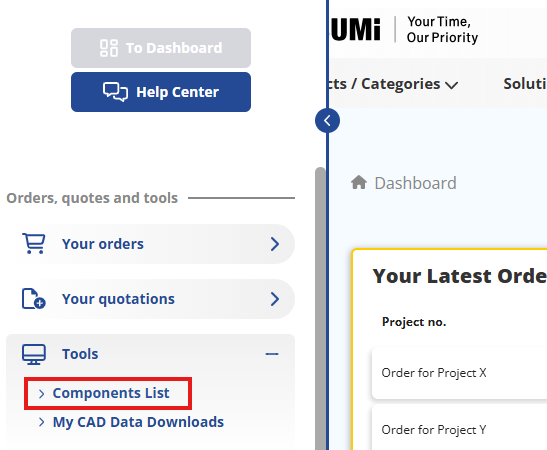
Components List in the MyMISUMI customer portal (CSSP)
You can find all the information about your components history in MyMISUMI customer portal:
- Log in to MyMISUMI profile
- Click 'Tools' in the left side menu and find 'Components list'
- You can organize and download csv files of your components, as well as directly ordering them
Documents and Certificates in the MyMISUMI customer portal (CSSP)
In the MyMISUMI customer portal, you can find specific documents and certificates (MISUMI and order related) and download them as PDF file:
- Log in to MyMISUMI-profile
- Click 'General Documents' in the left side menu
- There you can find the MISUMI ISO certificates, the ROHS and REACH Regulations as well as our supplier self-declaration to download the document as PDF.
- Click on the relevant document to download it as PDF file.
- Click 'Additional Documents' in the left side menu
- There you can find your current customer statement as well as invoice copies and delivery notes for already shipped orders.
- Click on the relevant document to download it as PDF file.
If you need additional documents, please contact us via the Help Center.
Quotation and Order History in the MyMISUMI customer portal (CSSP)
You can find your quotation and order histories in the MyMISUMI customer portal. Here you can find and download past and pending quotations and orders:
- Log in to your MyMISUMI profile
- In the dashboard you will already find an overview of the most recent orders and quotations
- Click on ‘To orders overview’ to access your order history
- Click on 'To Quotations overview' to access your quotation history
Here you can find and download past and open order confirmations and quotation requests. Also you can find and download further documents related to your orders, as well as the current status of open orders.
Corporate Data in the MyMISUMI customer portal (CSSP)
You can find the registered company data of your corporate account in the MyMISUMI customer portal:
- Log in to your MyMISUMI profile
- In the dashboard 'Your Details' on the right side of the page, you can find the most important information about your account
- Click on ‘Corporate Information’ to check the information of your company and payment
Please be aware that company details cannot be modified by the customers directly. In case some data need to be modified, please contact us via the Help Center.
User Data in the MyMISUMI customer portal (CSSP)
In the MyMISUMI customer portal you can check and maintain (most of) your personal user data:
- Log in to your MyMISUMI profile
- See in the dashboard 'Your Details' all information about your account
- Click on ‘Change User Data’ to change your user name (not your Login-ID), Email address and telephone number
What can I find the MyMISUMI customer portal (CSSP)?
In the MyMISUMI customer portal you can find information regarding the following points:
- User Data
- Corporate Data
- Order History
- Quotation History
- Documents & Certificates
- Componants List
- CAD-Download History
- How to connect with MISUMI?
Each point will be described in more detail in the MyMISUMI section of the FAQ.
What is the MyMISUMI customer portal (CSSP)?
The MyMISUMI customer portal - also called CSSP (Customer Self-Service Portal) - is our self-service online platform that provides customers with direct access to order and quotation-related information and documents 24/7 without any waiting time. It also serves as a direct contact interface with the MISUMI Customer Service.
A list and description of the MyMISUMI main features you can find in our FAQ.
Where can I find my order history?
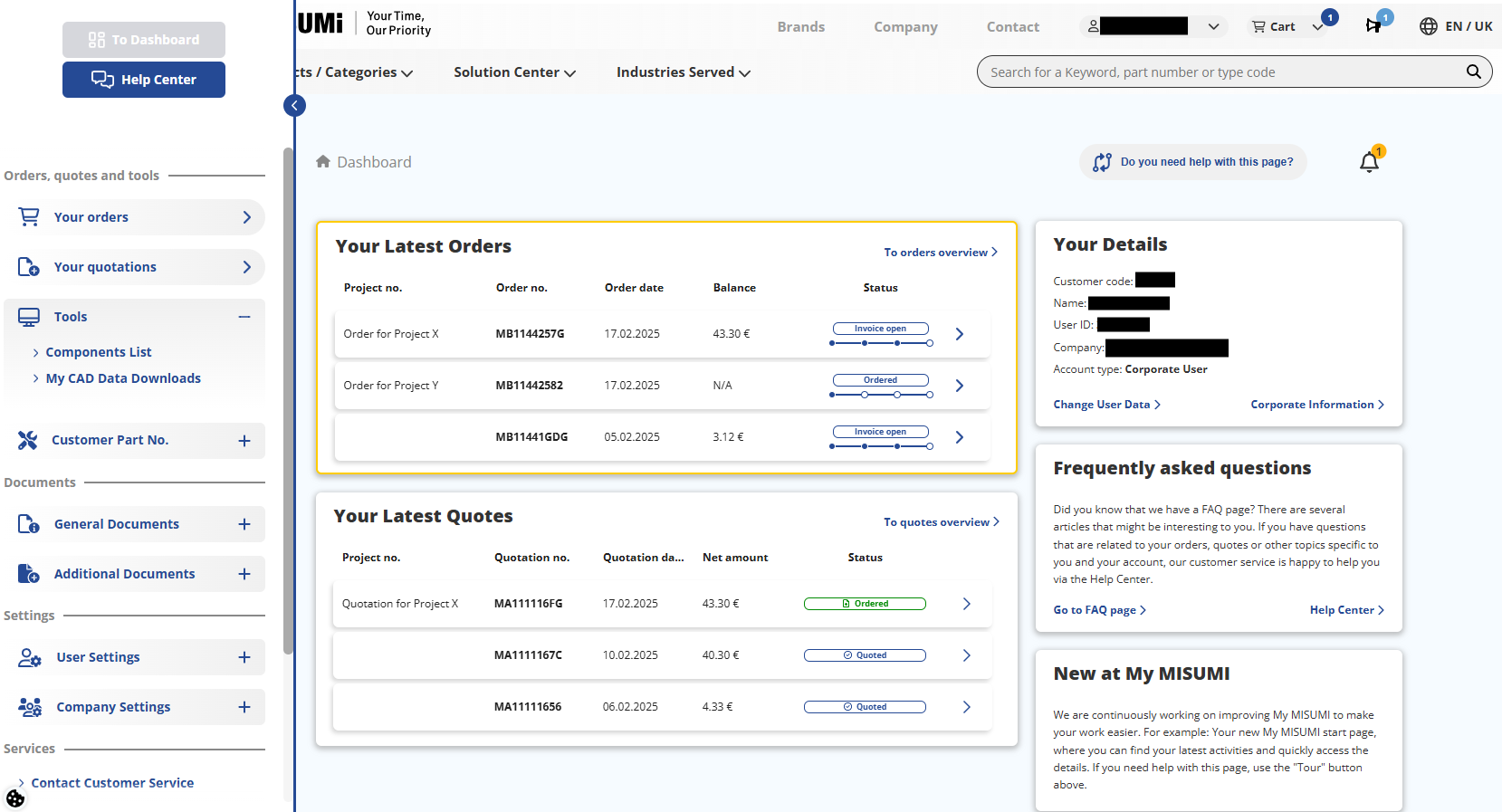
You can find your quotation and order histories in the MyMISUMI customer portal. Here you can find and download past and pending quotations and orders:
- Log in to your MyMISUMI profile
- In the dashboard you will already find an overview of the most recent orders and quotations
- click on To orders overview
Here you can find and download past and open orders as PDF files. Also you can find and download further documents related to your orders.
How does the administrator approval for activating additional corporate user accounts work?
If your company already has a corporate account with MISUMI, you can have an additional user account added to the existing corporate account. For more information on how to proceed with the registration process, please check the FAQ.
In order to complete the registration of an additional user account, approval from your company's internal administrator of the corporate account is required. The administrator will be informed about your user registration via email and needs to confirm it in the MyMISUMI customer portal. The administrator proceeds as follows:
- Log in to your MISUMI account.
- Go to the MyMISUMI customer portal.
- In the left-hand menu bar, first click on “Company Settings”, then on “User Management”.
- There you will find the “List of Users Waiting For Approval”
- Click on the blue underlined name of the user you want to confirm
- Check the user data thoroughly and verify that the user is an employee of your company
- You can decide whether to “reject” or “approve” the registration of the additional user account
- Click on the corresponding button
The additional user will be informed via email whether the user account has been approved or rejected.
If approved, the user can fully use the MISUMI web shop after logging in again.
If rejected, the user's account remains in the system as a CAD user account and is not linked to your company's corporate account.
A CAD user does not have ordering/quotation permission.
Why cannot I place my order directly?
If you request items in the MISUMI online shop which are currently not in stock, your order will be set 'on hold' by the system, until the supplier has confirmed the requested quantity and delivery date.
In cases like this, an error message highlighted in red appears in the quotation process. Please proceed as follows:
- Use the displayed option Request for MISUMI
- Enter the required quantity and the preferred delivery date and send the request. A reception number for your enquiry will be displayed.
It usually takes one working day to process the enquiry. As soon as you have received a response to your enquiry by email, you need to confirm it in the MyMISUMI customer portal:
- Log in to your MyMISUMI profile
- Go to ‘Enquiry List’ in the menu on the left-hand side
- You will see an overview of the enquiries and can confirm the relevant ones.
- Finalise your order.
Afterwards, you will receive your order confirmation as PDF file via email and can also review it in your order overview in the MyMISUMI customer portal after a short transmission time.